
Quiz Anti-Cheating Software
Prevent online exam cheating with browser lockdown, AI-powered proctoring, and real-time violation detection. When assessment results are trustworthy, credentials carry weight with employers, accreditors, and transfer institutions. OpenEduCat layers prevention, detection, and analysis so your faculty can focus on teaching instead of policing.
Quiz Anti-Cheating Software for Educational Institutions Benefits
Stop Cheating Methods Before the Exam Starts
Prevention is cheaper than investigation. Lock down the test environment so the most common cheating techniques (second tabs, copy-paste, screen sharing, unauthorized devices) are blocked before a student can attempt them.
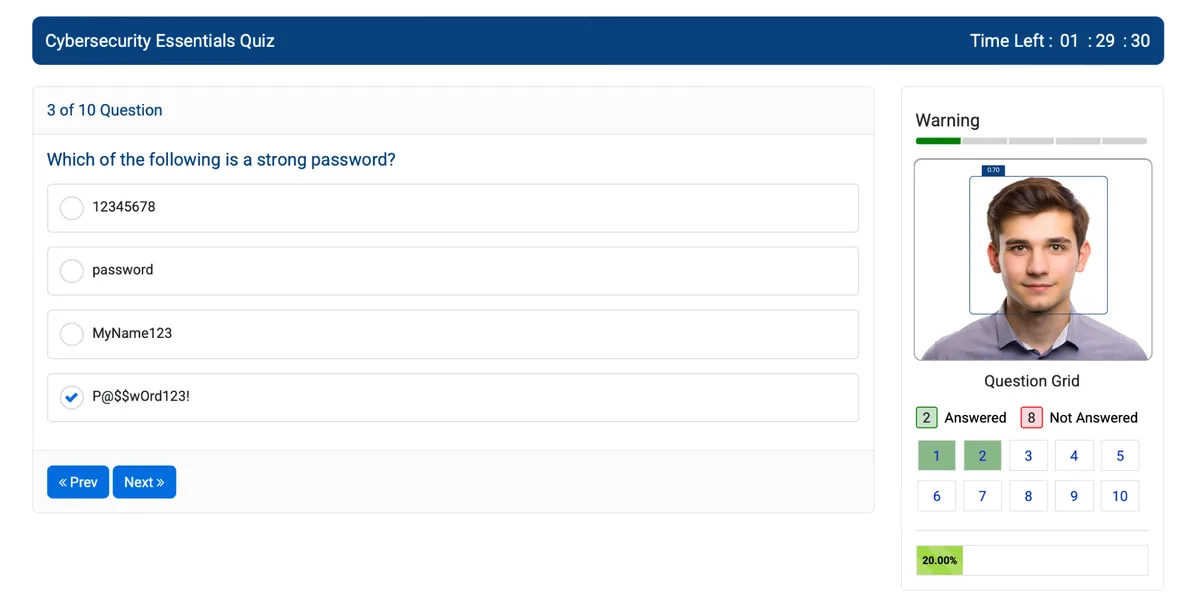
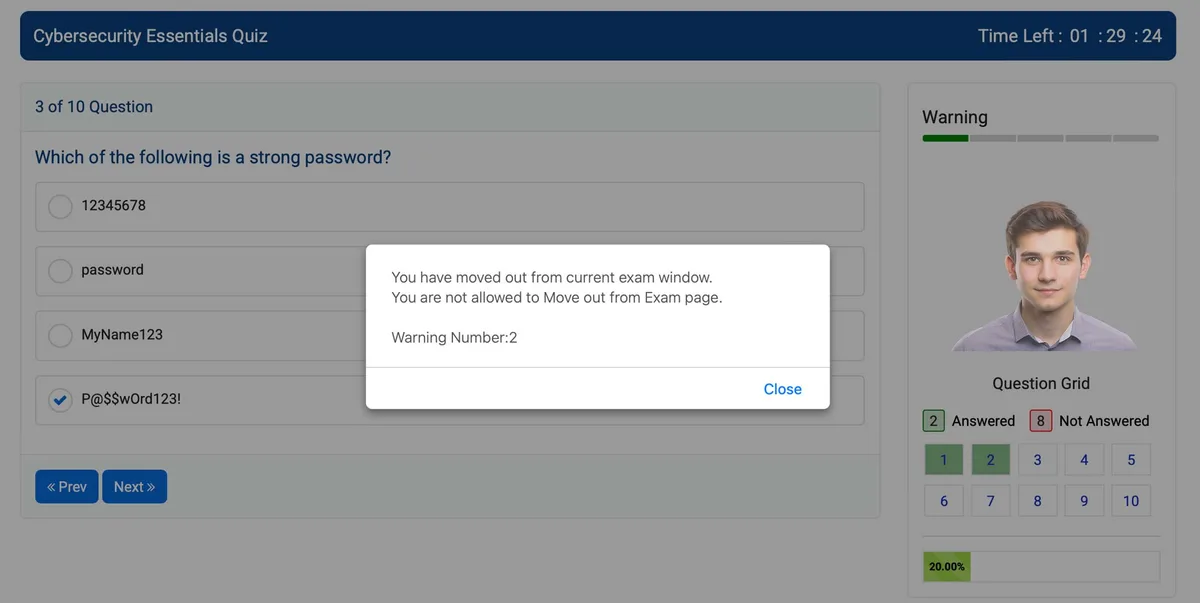
- Force full-screen mode on exam launch, students cannot resize, minimize, or switch windows without triggering a violation alert that both student and instructor see immediately
- Disable right-click context menus, Ctrl+C/Ctrl+V keyboard shortcuts, and print screen functionality so exam content stays inside the exam window
- Restrict exam access by IP range, time window, and device fingerprint, useful for proctored lab settings where you want exams taken only on campus computers during scheduled hours
Catch Suspicious Behavior During the Exam
Some cheating methods bypass lockdown, a second phone, a person standing behind the screen, notes taped to the wall. Real-time monitoring catches what browser controls cannot.
- Webcam-based face verification confirms the person taking the exam matches the enrolled student's photo on file, flagging identity mismatches within 30 seconds of exam start
- Gaze tracking detects when a student's eyes consistently move off-screen (toward a phone, notes, or another person) and logs timestamped screenshots for instructor review
- Multiple-person detection alerts proctors when a second face appears in the webcam frame, whether that is a roommate reading answers or someone whispering from behind
Identify Patterns After Submission
Post-exam analysis reveals collaboration and fraud that real-time monitoring misses. Cross-reference answer patterns, timing data, and access logs to build evidence before confronting a student.
- Similarity detection compares answer sequences across all students in a section, when two students select the same wrong answers in the same order, the system flags the pair for review
- Response-time analysis identifies exams completed far faster than the class average, a reliable indicator of pre-shared answers or unauthorized assistance
- IP correlation shows when multiple students submitted from the same network address or geographic location during the same exam window
Quiz Anti-Cheating Software for Educational Institutions Features
Everything you need to manage quiz anti-cheating software for educational institutions effectively
Core Management
Essential quiz anti-cheating software for educational institutions management capabilities
Student Portal
Self-service portal for students to access information
Basic Reporting
Standard reports and data export functionality
Role-Based Access
Configure user permissions and access levels
Advanced Analytics
Detailed quiz anti-cheating software for educational institutions analytics with custom report builder and data visualization
Workflow Automation
Configure automated rules for approvals, notifications, and status transitions
Audit Trail
Complete audit logging of all quiz anti-cheating software for educational institutions activities for compliance and accountability
Priority Support
Dedicated support team with SLA-backed response times
Frequently Asked Questions
Get answers to common questions about Quiz Anti-Cheating Software for Educational Institutions
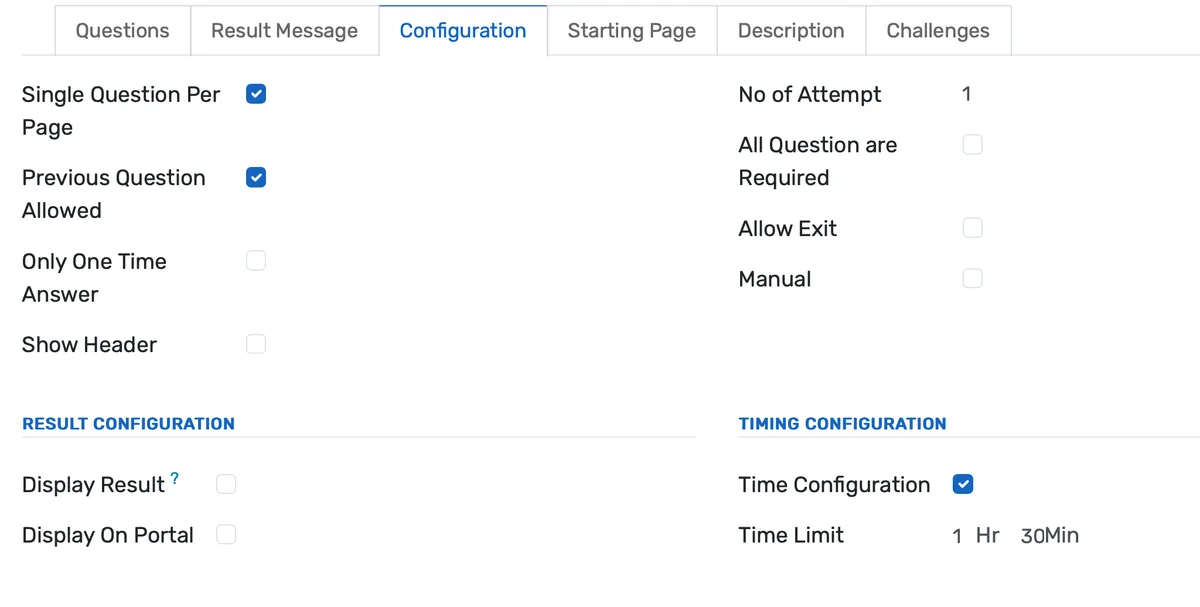
Yes. Anti-cheating settings are configured per exam, not globally. A low-stakes practice quiz might use only question randomization and a time limit. A midterm could add browser lockdown and focus-loss tracking. A high-stakes final exam might enable full AI proctoring with webcam verification and post-exam similarity analysis. Faculty choose the security level that matches the assessment's importance, and they can change settings any time before the exam opens.
Built for Your Institution Type
See how this feature works for your specific institution
Integrations, Comparisons & Tools
Extend Quiz Anti-Cheating Software for Educational Institutions with integrations, see how we compare, and calculate your ROI
Related Features

Admission Management
Student registration software that handles online applications, automated reviews, merit lists, and enrollment conversion. Your admissions office processes more registrations with fewer staff hours and fewer errors.

Student Management
Student information system software that keeps every record (academics, health, contacts, documents) in one place. SIS for K-12 schools and universities that gives staff accurate student data instantly and makes reporting effortless.

Course Management
Give academic coordinators tools to create, organize, and publish courses across departments. Track enrollment, content delivery, and learner progress from one administrative dashboard.

Examination System
Schedule hundreds of exams across multiple rooms without conflicts. Generate hall tickets, assign invigilators, and publish verified results in days — not weeks.

Gradebook and Grading System
Digital gradebook for registrars and academic directors — record grades, calculate GPAs, configure grading scales, and generate transcripts with a full audit trail per student.

Learning Management System
Cloud-based learning management system for schools and universities. Build courses with video, quizzes, and forums. Track student progress in real time. Issue certificates. One LMS platform connected to your student records, gradebook, and enrollment. No syncing or duplicate entry.
More Strategic Capabilities Features
Explore other features in this category
Ready to Transform Your Quiz Anti-Cheating Software for Educational Institutions?
See how OpenEduCat frees up time so every student gets the attention they deserve.
Try it free for 15 days. No credit card required.