
Document Management for Schools
Store every institutional file in one searchable repository with version history, role-based access permissions, approval workflows, and full audit trails. Staff find the right document in seconds instead of searching four different systems. Accreditation evidence, student records, policies, and contracts stay organized, current, and protected.
Document Management System for Educational Institutions Benefits
Find Any Document in Seconds Instead of Searching Five Systems
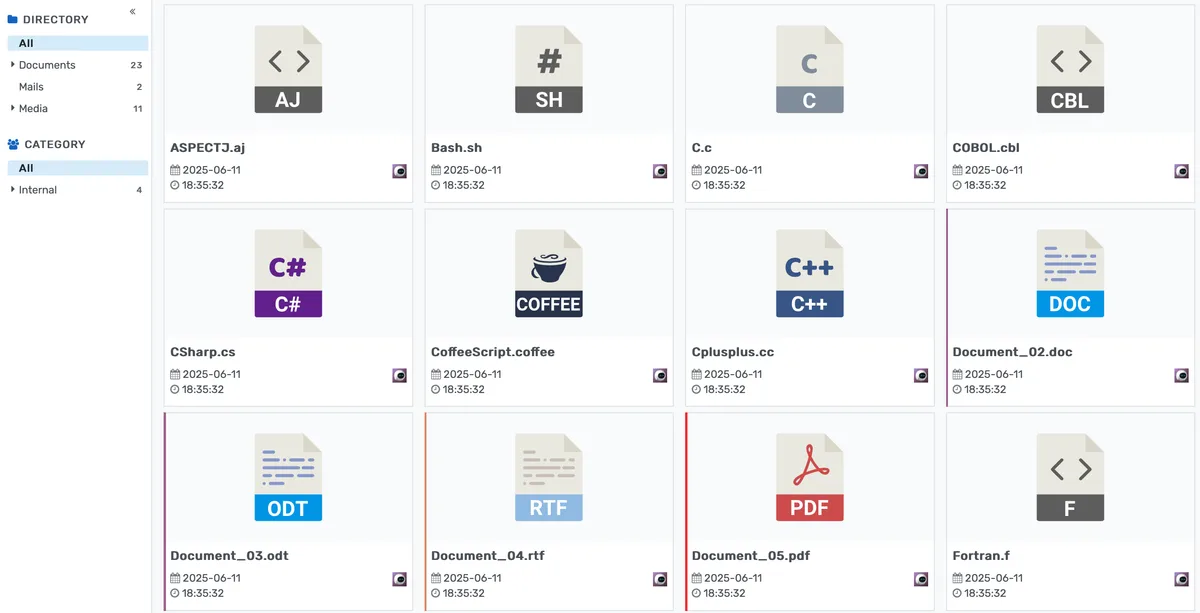
Every institutional file lives in one repository with full-text search, metadata tagging, folder hierarchies, and smart filters. Staff stop wasting hours digging through shared drives, email attachments, and filing cabinets.
- Full-text search indexes the contents of PDFs, Word documents, spreadsheets, and presentations so staff find files by searching for any word inside the document, not just the filename
- Tag documents by department, document type, academic year, accreditation standard, and any custom categories your institution defines
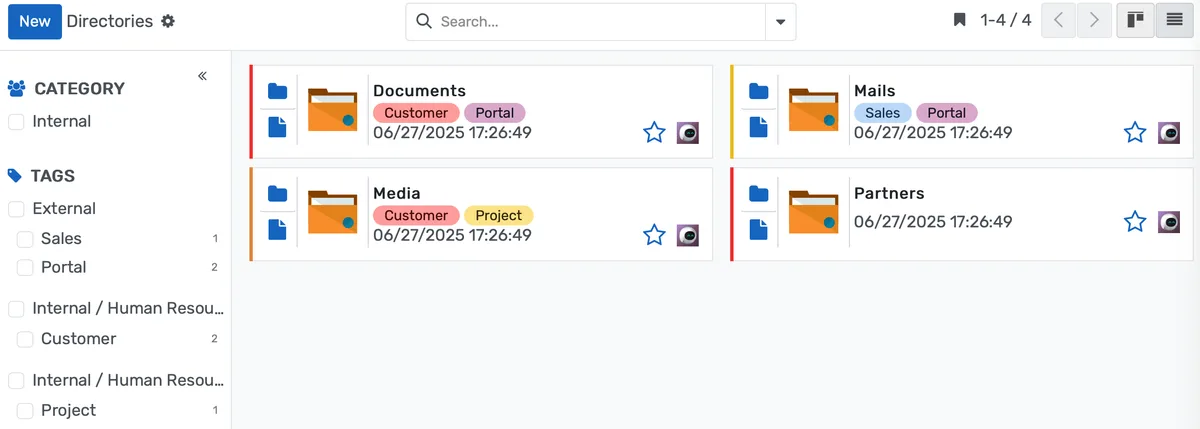
- Folder hierarchies mirror your organizational structure while cross-referencing tags let the same document appear in multiple logical contexts without duplication
Never Use an Outdated Policy, Form, or Template Again
Automatic version tracking ensures the current version is always the one staff see. Previous versions are preserved for audit and reference but clearly marked as superseded.
- When a document is updated, the new version automatically becomes the current one while all previous versions move to a numbered history list accessible in two clicks
- Check-in and check-out locking prevents two people from editing the same document simultaneously, eliminating merge conflicts and overwritten changes
- Change annotations let reviewers see exactly what was modified between any two versions, line by line, without downloading both files and comparing them manually
Control Who Sees What and Track Every Action
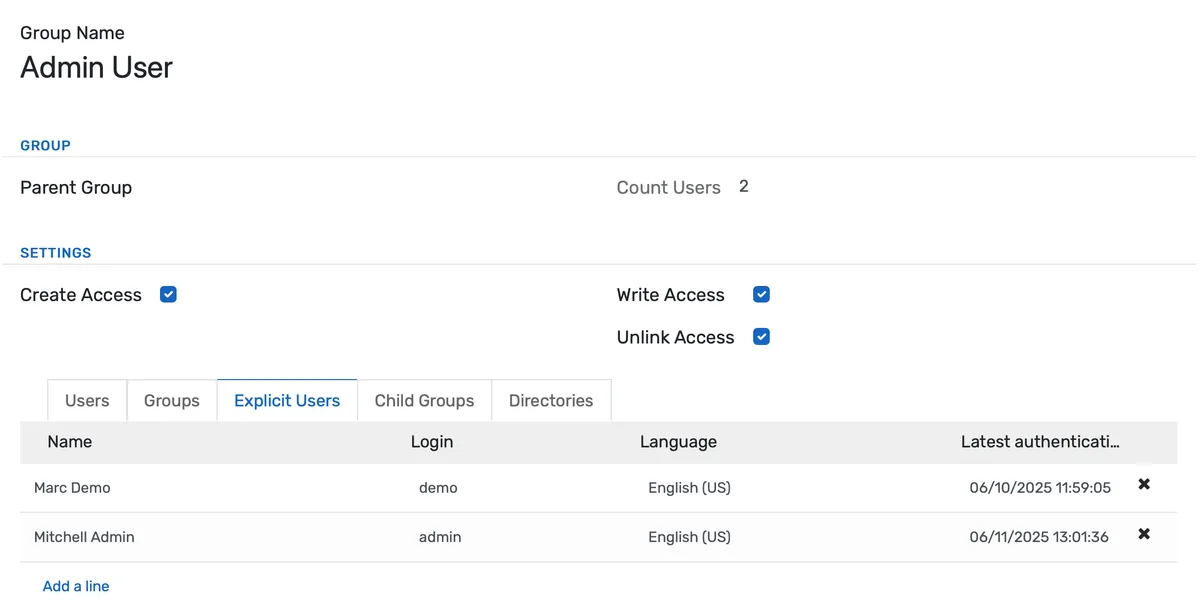
Role-based permissions, document-level restrictions, time-limited sharing, and full audit logging give IT and compliance teams the control they need without slowing down daily work.
- Set access at the role level (all faculty see curriculum documents), the department level (only HR accesses personnel files), or the individual document level (only the president sees this board memo)
- Time-limited access links let you share a document with an external auditor, accreditor, or consultant for 72 hours without creating a permanent account or losing control of the file
- Watermarking and download restrictions protect sensitive documents from unauthorized distribution, recipients can view but not download, or downloads carry an embedded watermark with the user's identity
Document Management System for Educational Institutions Features
Everything you need to manage document management system for educational institutions effectively
Core Management
Essential document management system for educational institutions management capabilities
Student Portal
Self-service portal for students to access information
Basic Reporting
Standard reports and data export functionality
Role-Based Access
Configure user permissions and access levels
Advanced Analytics
Detailed document management system for educational institutions analytics with custom report builder and data visualization
Workflow Automation
Configure automated rules for approvals, notifications, and status transitions
Audit Trail
Complete audit logging of all document management system for educational institutions activities for compliance and accountability
Priority Support
Dedicated support team with SLA-backed response times
Frequently Asked Questions
Get answers to common questions about Document Management System for Educational Institutions
Documents are stored once but can be tagged with multiple categories, departments, accreditation standards, and academic years. A financial audit report, for example, can appear in the Finance department's folder view, the accreditation evidence collection, and the board documents workspace, all pointing to the same single file. When that file is updated, every view reflects the change immediately. There is no risk of one department working from a stale copy while another has the current version. Cross-referencing tags replace the need for duplicate files entirely.
Built for Your Institution Type
See how this feature works for your specific institution
Integrations, Comparisons & Tools
Extend Document Management System for Educational Institutions with integrations, see how we compare, and calculate your ROI
Related Features

Admission Management
Student registration software that handles online applications, automated reviews, merit lists, and enrollment conversion. Your admissions office processes more registrations with fewer staff hours and fewer errors.

Student Management
Student information system software that keeps every record (academics, health, contacts, documents) in one place. SIS for K-12 schools and universities that gives staff accurate student data instantly and makes reporting effortless.

Course Management
Give academic coordinators tools to create, organize, and publish courses across departments. Track enrollment, content delivery, and learner progress from one administrative dashboard.

Financial Management
Set up fee structures once — auto-generate invoices at enrollment, accept payments via cash, bank, or online gateway, apply discounts, and reconcile. Close books faster with fewer errors.

Examination System
Schedule hundreds of exams across multiple rooms without conflicts. Generate hall tickets, assign invigilators, and publish verified results in days — not weeks.

Faculty Management
Manage faculty profiles, balance workloads, coordinate substitutions, track credentials, and run performance reviews — freeing department heads from administrative overhead.
More Strategic Capabilities Features
Explore other features in this category
Ready to Transform Your Document Management System for Educational Institutions?
See how OpenEduCat frees up time so every student gets the attention they deserve.
Try it free for 15 days. No credit card required.